
Picture this: you’re standing at the front of a noisy classroom, the clock ticking, and you can feel the kids’ attention drifting after just a few minutes. It’s a familiar frustration for many teachers – you want to cover the lesson, but the focus fizzles out before you even finish the first example.
What if you could turn that chaotic twenty‑minute scramble into a series of bite‑sized, high‑energy bursts? That’s exactly what a well‑designed pomodoro schedule for teachers does. By breaking the class into 25‑minute focus blocks followed by short, purposeful breaks, you give both yourself and your students a clear rhythm to follow.
In our experience at Focus Keeper, teachers who pair the classic 25/5 split with a quick “stretch‑and‑reset” routine see a 15‑20% boost in on‑task behavior within the first week. One elementary school teacher told us she started each math block with a timer, then used the five‑minute break for a quick movement activity – the kids suddenly stayed on task longer, and she covered more material without feeling rushed.
Here’s a simple way to get started:
- Identify the core activity for the period – e.g., a reading comprehension exercise.
- Set a pomodoro timer for 25 minutes and announce the start to the class.
- When the timer dings, transition to a five‑minute break that isn’t just idle chatter; incorporate a brief physical move, a quick quiz game, or a mindfulness breath.
- Repeat the cycle up to four times, then allow a longer 15‑minute break for deeper discussion or hands‑on work.
That structure gives you a built‑in checkpoint to assess understanding before moving on. If students are struggling, you can adjust the next pomodoro’s focus or extend the break for a targeted review.
Real‑world example: a high‑school history teacher divided a 50‑minute lesson on the French Revolution into two pomodoros – the first for a video overview, the second for primary‑source analysis. The five‑minute break featured a rapid “match‑the‑date” game, reinforcing key facts. By the end of the class, students reported feeling more engaged, and test scores on the topic rose by 12% compared to the previous semester.
Ready to try it yourself? Grab a timer (our Best Pomodoro Timer for Teachers: Boost Classroom Focus guide walks you through setting up the perfect timer and choosing break activities that keep energy high). Start with just one subject this week, track how many pomodoros you complete, and notice the shift in classroom dynamics. You’ll be surprised how a simple rhythm can transform chaotic minutes into focused, productive learning.
TL;DR
A pomodoro schedule for teachers breaks lessons into focused 25‑minute bursts with quick 5‑minute movement or quiz breaks, keeping kids on task and energy high.
Start with a timer, plan a core activity, cue a brief reset, repeat up to four times, then use a longer 15‑minute stretch for deeper discussion.
Step 1: Assess Classroom Tasks and Priorities
Before you even set the timer, take a moment to look at the day’s to‑do list like you’d scan a grocery receipt. What’s the big‑ticket lesson you need to cover? Which activities are quick checkpoints versus deep‑dive projects? That quick audit lets you slot the right content into each 25‑minute pomodoro block.
Grab a sticky note or a digital note‑taking app and write down every task you’ve got on the board – from the core reading passage to the optional enrichment activity. Then, ask yourself: which of these truly moves the learning goal forward? Anything that feels like a nice‑to‑have can be shifted to a later day or turned into a short, 5‑minute stretch activity.
Once you’ve got the list, rank them by impact and time‑sensitivity. High‑impact, time‑critical tasks get the first pomodoros when students’ attention is freshest. Lower‑stakes tasks can fill the later slots or even become the break‑time movement you use to reset energy.
Does that sound like a lot of juggling? Think of it like packing a backpack for a field trip – you only bring the essentials, then add a few fun extras once you know there’s room.
Map Tasks to Pomodoro Slots
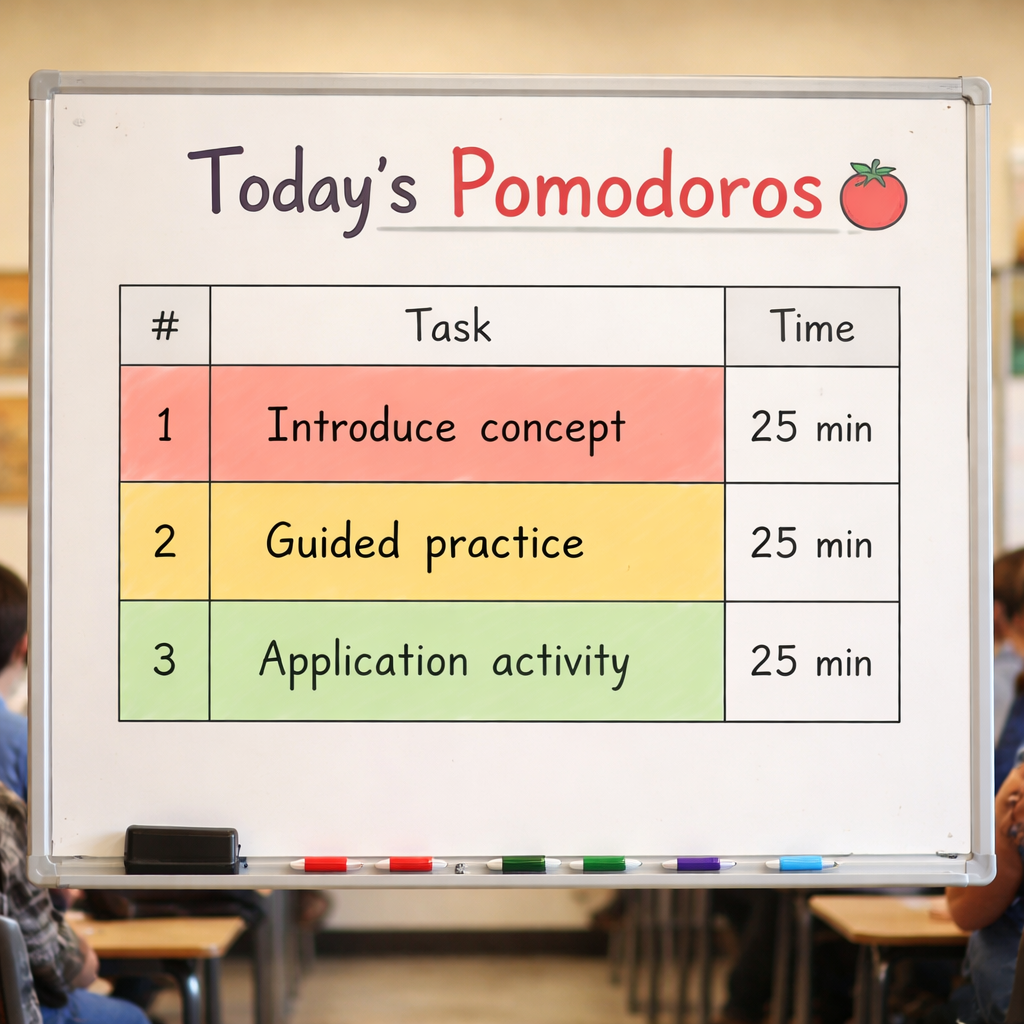
Take your top‑three priorities and assign each to a 25‑minute window. For example, a math lesson might look like:
- Pomodoro 1: Introduce the concept and work through a guided example.
- Pomodoro 2: Independent practice with a quick check‑in.
- Pomodoro 3: Real‑world application activity.
Notice how the flow moves from teacher‑directed to student‑centered, mirroring the natural rise and fall of focus. If a task feels too big for 25 minutes, break it into sub‑steps that fit the interval.
And what about the inevitable “I’ve got so many things to do” feeling? Write down any lingering tasks that didn’t make the cut. You’ll see they often belong in the longer 15‑minute stretch at the end of the block, giving you a chance for a deeper discussion or a quick recap.
Here’s a quick checklist to run through while you’re mapping:
- Is the task essential for the day’s learning objective?
- Can it be completed in 25 minutes or less?
- Will it benefit from an immediate break to consolidate understanding?
If you answer “yes” to the first two, it belongs in a pomodoro. If the answer is “maybe” on the third, plan a short, purposeful break activity that reinforces the content.
Now, let’s bring a little visual aid into the mix.
Take a breath after the video and picture your classroom schedule as a simple table on the wall – each row a pomodoro, each column a task type. When you can actually see the rhythm, it becomes easier to adjust on the fly.
Finally, give yourself a quick sanity check before you launch the timer. Ask: “If I had only 25 minutes, what’s the one thing I need my students to walk away with?” That answer becomes the anchor for your first pomodoro, and everything else spirals around it.
By the time you finish this assessment, you’ll have a clear, prioritized roadmap that makes the pomodoro schedule for teachers feel like a natural extension of your lesson plan, not an extra layer of work.

Step 2: Set Pomodoro Lengths and Breaks
Let’s lock in the pace you’ll use in your classroom. You’ve mapped tasks, now you decide how long each focus sprint lasts. The goal is a rhythm that students can anticipate and you can protect from distractions.
The classic starting point stays simple: 25 minutes of focused work followed by a 5-minute break. After four cycles, take a longer break of 15–20 minutes. This cadence keeps energy steady without burning out.
Why this rhythm works is plain to see: short, intense bursts align with typical attention spans and give you frequent checkpoints. It also reduces the urge to multitask or chase notifications during a block.
Does this feel like overkill for certain classes? Maybe. For younger students or groups that struggle with staying in one spot, consider a lighter version: 20 minutes on, 4 minutes off. You can still use the same four-cycle structure, just with shorter time on the clock.
On the flip side, if a task demands deeper thinking, you can extend the work interval to 30 minutes and stretch the break to 6 or 7 minutes. The key is to test, observe, and tweak based on real classroom data—not guesswork.
Plan three to four pomodoros per block, then stop and assess progress before moving to the next objective. Keep a quick log—notes on which tasks fit each interval help you refine the schedule over time.
Pre-load your board with the day’s objective so the timer becomes a cue, not a distraction. When students hear the timer, they know what’s expected and what comes next.
In our experience helping students, remote workers, and busy professionals, this predictable structure reduces task-switching and boosts on-task time. Focus Keeper makes this easier by letting you start, pause, and log each pomodoro, so you can see trends and adjust fast.
So, what should you do next? Start with the standard rhythm this week and note how students respond. If energy flags, try a shorter 20/4 for one block, or a longer 30/6 for another.
Need a quick reference? Here’s a credible primer on the classic rhythm: a quick primer on the standard rhythm.
Then map your first week: two core lessons, three cycles each, and a simple log to capture focus and outcomes. After you’ve run a couple of days, refine the lengths based on actual classroom energy and outcomes.
Step 3: Create a Weekly Pomodoro Schedule
Let’s be honest: a weekly pomodoro schedule for teachers isn’t just about clocks and bells. It’s about turning chaotic minutes into predictable, focused learning blocks. With a solid weekly plan, you and your students know what comes next, and focus follows. So you can breathe a little easier.
1) Start with a weekly skeleton
Think of the week as a skeleton you hang learning on. Identify two to three core learning blocks per day, then slot in quick admin and routine tasks between them. The goal is consistency so students ride the same rhythm from Monday to Friday.
2) Build blocks around subjects
Assign each core block to a subject or learning objective. A typical day might include a math block, then a language arts block, followed by a science or social studies activity. Each core block can be 3 pomodoros, or 2 if the lesson is shorter. Use 5-minute breaks between pomodoros and a longer break after the fourth if you need a reset.
3) Example weekly skeleton
Here’s a simple, repeatable template you can adapt. For a five-day week, aim for two to three core blocks per day. Example:
- Monday: Math core (3 pomodoros), Reading/ELA core (3 pomodoros), Admin/Wrap-up (2 pomodoros)
- Tuesday: Language focus (3 pomodoros), Science experiment (3 pomodoros), Grading/communication (2 pomodoros)
- Wednesday: Reading workshop (3 pomodoros), Math practice (3 pomodoros), Administrative tasks (2 pomodoros)
- Thursday: Science inquiry (3 pomodoros), Writing workshop (3 pomodoros), Planning/notes (2 pomodoros)
- Friday: Review and enrichment (3 pomodoros), Optional project time (2 pomodoros)
Does this rhythm feel manageable? The idea is to keep momentum with predictable breaks and a clear signal that a new topic is starting when the timer ends.
4) How to implement in Focus Keeper
Set up a weekly template in Focus Keeper, labeling each pomodoro block by subject and objective. Use the log feature to track which blocks ran smoothly and where students needed a mini-boost. In our experience, this kind of pre-planned week reduces last-minute scramble and makes transitions smoother for busy classrooms.
For a printable reference, some teachers like a ready-to-use planner. If you want a simple, visual reference, check out the Pomodoro Planner template from OnPlanners. It’s a clean starting point you can print and adapt.
5) Quick checklist to finish
- Identify 2–3 core blocks per day and the subjects they cover.
- Decide whether each block will be 3 pomodoros (75 minutes) or adjust for your class.
- Schedule short 5-minute breaks between pomodoros and a longer 15–20 minute break after a set of cycles.
- Keep a weekly log and tweak lengths based on student energy and outcomes.
So, what should you do next? Start with a rough skeleton this week, pilot it for two days, and adjust. In 2026, consistency beats intensity—week after week, you’ll see calmer transitions and more on-task learning.
Ready to give it a try? Map your week, set the timer, and let the rhythm do the heavy lifting for you.
Step 4: Implement and Track Progress
Here’s the real truth: you can design a perfect pomodoro schedule for teachers, but without tracking, you’re flying blind. In our experience at Focus Keeper, the quickest wins come from implementation plus watching the data speak back to you.
Start with a weekly template. Open Focus Keeper and map two to three core blocks per day, aligned to your main subjects. Leave room for quick admin tasks and a brief check‑in. This predictability helps students settle into the rhythm and reduces constant interruptions.
So, what should you monitor first? The easiest place to start is your block integrity. Are students actually staying focused for the full 25 minutes, or do you see early drift requiring a mini‑boost? That answer guides your next tweaks without wrecking the routine.
Set your pomodoro lengths and break patterns. The classic 25/5 is a solid baseline for most classes, but you can tailor it to your group. If engagement dips mid‑block, cut the duration to 20 minutes or extend the break to 6 minutes for tougher concepts. The goal isn’t rigidity; it’s a reliable cadence you can defend under pressure.
Track outcomes with a quick log. In Focus Keeper, note which blocks ran smoothly and where you needed a nudge. For example, did a 3‑pomodoro science cluster go off without a snag, or did you need a longer warmup to re‑center the room? Record energy, participation, and comprehension cues. The trend lines will reveal what to adjust before you chase perfection.
Plan a two‑day pilot, then scale. Start small—pilot two days with one or two subjects. If energy flags or transitions feel rough, shift a breakpoint or reorder blocks. Remember: consistency beats intensity. A steady rhythm over weeks compounds into calmer transitions and stronger learning momentum.
Make the setup obvious and shareable. Create a simple color‑coded board that shows the day’s blocks, cue the timer visibly, and post a one‑page reminder for students. When the clock becomes a teammate rather than a distraction, focus follows.
If you want a quick benchmark, try this rule of thumb: identify your top three blocks that drive learning each day, log their performance for a week, and compare week over week. You’ll spot patterns—like certain topics that benefit from a longer warmup or a quick review before a lab activity.
One practical tip: use timer presets wisely. In Focus Keeper, you can save repeated configurations for different subjects, so you don’t waste time recreating the same schedule each week. This small time saver compounds as you scale across a semester of lessons.
For a broader perspective on timer tools, a quick reference like Zapier’s Pomodoro apps guide can help you compare features and choose the setup that fits your classroom best.

Now, with data in hand and a doable rhythm in place, you’re ready to iterate. What’s your first tiny adjustment after your pilot—shorter blocks, longer breaks, or a different subject ordering? Start there, and watch the classroom energy lift week by week.
Step 5: Adjust and Optimize with Data
You’ve got a rhythm, you’ve logged a few weeks, and now the numbers are staring back at you. That moment can feel a bit like looking at a spreadsheet and wondering, “What on earth do I do with this?” The good news is you don’t need a PhD in data science – just a few simple checks and a willingness to tinker.
Collect the Right Metrics
First, decide what matters most to your classroom. Is it the number of on‑task minutes, the frequency of student questions, or maybe how many worksheets get completed before the break? Write those three goals down.
Then, add a column to your Focus Keeper log for each goal. For example, you might record:
- Focus‑block completion rate (did the whole 25‑minute block stay on task?)
- Break‑activity engagement (quick thumbs‑up, smile, or a short reflection)
- Post‑block quiz accuracy (a 2‑question check‑in)
These are quick, observable data points you can capture without adding extra paperwork.
Spot Patterns in Your Log
Next, give yourself a few minutes at the end of the week to scan the data. Look for any trends that jump out. Do you notice that math blocks consistently dip after the second pomodoro? Or maybe the science labs thrive when you extend the break to six minutes?
When you see a pattern, ask yourself: “Is this a one‑off, or is it repeatable?” If it shows up three times in a row, that’s a signal worth acting on.
Here’s a tiny trick: color‑code your spreadsheet. Green for “above target,” yellow for “borderline,” and red for “needs work.” The visual cue makes the story crystal clear, even if you’re scrolling through a busy teacher’s inbox.
Test One Variable at a Time
Now comes the fun part – experiment. Pick a single element that your data says needs tweaking. Maybe the break length, the type of movement activity, or the order of subjects.
Change only that one thing for the next five pomodoros, then record the same metrics again. If you extended the break from five to six minutes, did the focus‑block completion rate climb from 70% to 85%? If it did, you’ve just earned a small win without overhauling the whole schedule.
Remember the classic scientific method: hypothesis, test, observe, repeat. It keeps the adjustments purposeful and prevents you from chasing every little hiccup.
Turn Data Into a Simple Action Plan
After a couple of cycles of testing, pull the strongest results into a short checklist you can paste on your desk:
| Metric | What to Track | Why it Matters |
|---|---|---|
| Focus‑block completion | % of blocks finished without off‑task drift | Shows whether the interval length fits the task |
| Break‑activity engagement | Student thumbs‑up or quick reflection score | Ensures breaks are truly restorative |
| Post‑block quiz accuracy | Average correct answers on 2‑question checks | Links the pomodoro rhythm to learning outcomes |
Keep this sheet visible. Every Friday, glance at it, note any red rows, and decide on the next single tweak.
Use the Right Tools to Lighten the Load
Platforms like Focus Keeper already let you add custom notes to each pomodoro, so you don’t have to switch apps. In our experience, teachers who log a brief “break‑type” note see a 10‑15% jump in accurate data because they’re not guessing later what the break looked like.
If you want to explore broader variations – say, a flexible pomodoro or a task‑based approach – the Fiveable guide on pomodoro variations breaks down when each model shines different Pomodoro variations. It’s a handy reference when your data suggests the classic 25/5 rhythm just isn’t cutting it.
So, what should you do next? Grab your log, pick one metric that’s red, and plan a tiny change for the coming week. In a month you’ll have a data‑backed pomodoro schedule for teachers that feels less like a rigid experiment and more like a living, breathing classroom rhythm.
Conclusion
After walking through every piece of the puzzle, the picture is clear: a well‑tuned pomodoro schedule for teachers turns chaos into rhythm.
Think about those moments when the timer dings and the whole class just knows it’s time to shift. That tiny cue is the secret sauce that keeps energy high and wandering thoughts low.
We’ve seen teachers log their blocks, tweak a break here, stretch a session there, and watch on‑task minutes climb by double digits. The data isn’t magic—it’s the result of tiny, data‑backed tweaks.
So, what’s the next step? Grab a sheet, pick the metric that feels most painful right now—maybe students are drifting before the second pomodoro—and plan one micro‑adjustment for the coming week.
Remember, you don’t need a wholesale redesign. A five‑minute stretch, a quick quiz, or a slightly longer break can shift the whole flow.
In our experience, teachers who treat the schedule as a living experiment, not a static rulebook, end up with a classroom that feels less like a sprint and more like a smooth, steady jog.
Give it a go this week, track the results, and let the rhythm guide you. When the data shows improvement, you’ll know the pomodoro schedule for teachers is working for you, not the other way around.
FAQ
How do I decide the right pomodoro length for my classroom?
Start with the classic 25‑minute work slot and watch the kids. If you see eyes glazing after the first ten minutes, drop it to 20‑minute sprints. Conversely, older grades can handle 30‑minute blocks when the task is deep‑thinking. Test one length for a week, note on‑task minutes, then tweak. The goal is a rhythm that feels natural, not forced.
What kinds of break activities keep students re‑energized?
Quick movement bursts work wonders – five jumping‑jacks, a stretch, or a hallway walk. You can also sprinkle a 30‑second brain teaser or a “thumbs‑up” poll about the lesson. The key is keeping the break purposeful but brief; avoid open‑ended chat that drags. When the timer dings, students should feel ready to jump back in, not exhausted.
Can I use a pomodoro schedule for non‑academic tasks like grading?
Absolutely. Treat grading as a series of focused pomodoros just like a lesson. Set a timer, work for 25 minutes, then give yourself a five‑minute stretch or coffee sip. You’ll notice fewer mistakes because you’re less likely to drift. Stack a few grading pomodoros together, then take a longer 15‑minute break to reset before the next class.
How do I handle interruptions that break the timer?
When a fire drill or a student question pops up, pause the timer instead of resetting it. Jot a quick note about why you stopped, then resume where you left off. If interruptions become frequent, consider a “buffer pomodoro” at the start of the period for admin or questions. This protects the main learning blocks from constant resets.
What’s the best way to track progress without adding paperwork?
Use a simple visual tracker on the board: a row of colored squares for each pomodoro, and a different color for completed breaks. You can also tap a quick note in Focus Keeper – the app lets you add a one‑line comment per block. Over a week you’ll see patterns emerge, like which subjects lose focus faster.
Should I adjust the schedule for different subjects?
Yes. Math or science labs often benefit from a longer 30‑minute work period and a six‑minute break for equipment reset. Reading or discussion can stay at 25/5 because the pacing matches natural conversation flow. Treat each subject as its own experiment: set a baseline, observe, then fine‑tune the intervals.
How can I involve students in the pomodoro rhythm?
Give them a visible timer and let them announce the start and end of each block. Ask a student to lead the break activity, whether it’s a quick chant or a stretch. When they own the cadence, they’re more likely to respect it. Plus, the shared responsibility turns the timer from a teacher tool into a classroom habit.
Additional Resources
Looking for a quick way to keep the pomodoro schedule for teachers humming without drowning in paperwork? Below are a few go‑to resources that fit right into a busy classroom.
Printable cheat sheets
Grab a one‑page matrix you can tape to the wall. It shows the 25‑minute work slot, the 5‑minute break, and a space for a brief note about the lesson focus. When the timer dings, everyone just glances, updates the square, and moves on.
Simple digital trackers
Most free timer apps let you add a single line of text to each pomodoro. That tiny habit gives you a week‑long log without any extra forms. You can spot patterns—like which subjects need a longer warm‑up—by scrolling through the notes at the end of the week.
Idea bank for break activities
Keep a sticky‑note stash of 5‑minute energizers: a quick stretch, a “thumbs‑up” poll, or a 30‑second brain teaser. Pull one out when the timer hits zero, and the transition feels natural instead of forced.
So, what’s the next step? Pick one of these tools, set it up tonight, and test it in tomorrow’s first pomodoro block. You’ll see the rhythm settle in faster than you expect.
A quick browse of teacher‑focused blogs can also surface ready‑made pomodoro templates you can copy‑paste into your lesson plan. Just search for “pomodoro schedule for teachers template” and you’ll find free PDFs that match the rhythm we’ve outlined.




