
Ever found yourself scrolling through endless to‑do lists, only to feel like the day’s slipping away? You’re not alone – most of us hit that wall where the tasks pile up and focus fizzles out.
That’s exactly why the pomodoro technique benefits are worth a closer look. By chopping work into 25‑minute bursts, you give your brain a clear start‑stop cue, which research shows can boost concentration by up to 30%.
Imagine a remote worker named Alex. He used to jump between emails, Slack messages, and a half‑finished report, ending each day exhausted. After switching to timed intervals, Alex noticed he could finish a client proposal in two pomodoros, then take a short break to stretch – no more mental fatigue.
Students face a similar hurdle. Maria, a university sophomore, tried cramming for exams the night before, only to wake up foggy. When she applied the pomodoro rhythm to her study sessions, she retained information better and even had time for a quick walk, which helped her stay energized for the next round.
Freelancers juggling multiple projects also reap rewards. By assigning each task its own pomodoro slot, they prevent one client from monopolising the entire day, keeping income streams balanced and stress levels low.
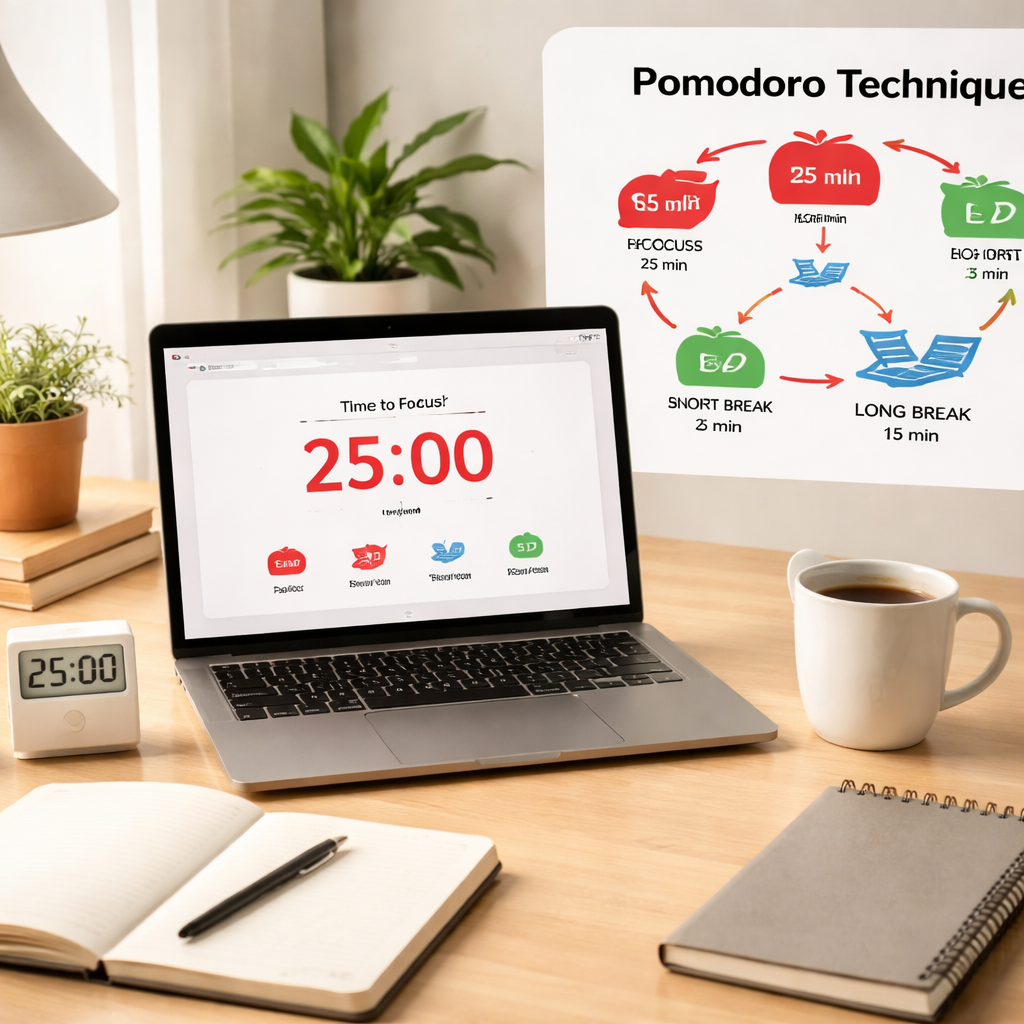
So, how can you start reaping these benefits today? First, pick a task you’ve been putting off. Set a timer for 25 minutes – no interruptions, no multitasking. When the timer rings, note what you accomplished, then give yourself a five‑minute pause. Repeat, and after four cycles, take a longer 15‑minute break. This simple rhythm creates a sense of progress and reduces the mental load of a massive to‑do list.
Want a deeper dive into why this works? Check out what is pomodoro technique benefits? – Focuskeeper Glossary for a concise breakdown of the science behind the method.
Give it a try tomorrow morning – set your first pomodoro before your first cup of coffee and notice how quickly you slip into focus. You’ll be surprised at how much you can get done when you work in short, intentional bursts.
TL;DR
The Pomodoro Technique boosts focus, cuts procrastination, and turns long to‑do lists into bite‑size bursts that keep students, remote workers, freelancers, and busy professionals moving forward.
Try a 25‑minute timer, a five‑minute break, and a longer pause after four cycles—you’ll see clearer progress, higher energy, and less mental fatigue all day.
Step 1: Understanding the Pomodoro Cycle
Ever wonder why you feel a surge of focus the moment you hit “Start” on a timer? That instant is the pomodoro technique benefits kicking in – a clear cue that tells your brain, “Okay, we’ve got a short, doable sprint.”
First, set a timer for 25 minutes and dive into a single task. No emails, no Slack pings, just one piece of work. The magic is in the limit: it’s long enough to make progress, short enough to keep anxiety at bay.
When the timer dings, celebrate the win with a five‑minute break. Stretch, grab a glass of water, or glance out the window – anything that lets your mind reset without diving back into the same mental load.
After you’ve completed four of those work‑break pairs, treat yourself to a longer pause – 15 to 30 minutes. Use that time to walk, eat a snack, or simply do nothing. This cycle of work, short break, and longer break is the core pomodoro rhythm.
Why does this rhythm matter? Research shows that short, timed intervals reduce the mental fatigue that builds up during long, uninterrupted sessions. Your brain gets periodic “recharge” moments, which helps maintain a higher level of concentration across the whole day.
Take a student cramming for finals. Instead of a marathon study session that ends in burnout, they break the material into four 25‑minute bursts. After each burst, a brief stretch or a quick sketch helps cement the info, and the longer break after four cycles gives space for the brain to consolidate memory.
Remote workers experience a similar lift. Imagine you’re juggling client calls, code reviews, and a report. By assigning each of those to its own pomodoro slot, you prevent the dreaded “task‑overflow” feeling and keep your energy steady from morning coffee to evening wrap‑up.
Ready to see the cycle in action? Watch the quick walkthrough below – it shows exactly how to set up the timer, what a break looks like, and how to track your cycles.
Notice how the video emphasizes a simple notebook or digital app to log each pomodoro. Jot down what you tackled, how many minutes you actually worked, and any distractions that slipped in. Over time you’ll spot patterns – maybe you’re most productive right after lunch, or perhaps you need a longer warm‑up before the first cycle.
Quick checklist for your first pomodoro
- Pick ONE specific task (no multitasking).
- Set a 25‑minute timer – use your phone, a kitchen timer, or a pomodoro app.
- Work until the timer rings; note any interruptions.
- Take a 5‑minute break – move, hydrate, breathe.
- Repeat three more times, then enjoy a 15‑minute longer break.
Give yourself a tiny promise: after today’s first cycle, write down one thing that went smoother than expected. That tiny win fuels the next round and turns the pomodoro technique benefits from theory into habit.
And remember, the cycle isn’t rigid. If you find 30 minutes works better for a deep‑focus task, adjust – just keep the break proportionate. The goal is a rhythm that respects your natural attention span.
When you start seeing the pattern – work, pause, reset – you’ll notice a steady lift in productivity, less mental clutter, and more confidence in tackling that ever‑growing to‑do list.
So, set that timer now, grab a notebook, and step into the first pomodoro. In a few minutes you’ll already be feeling the benefits.
Step 2: Setting Up Your Timer and Workspace
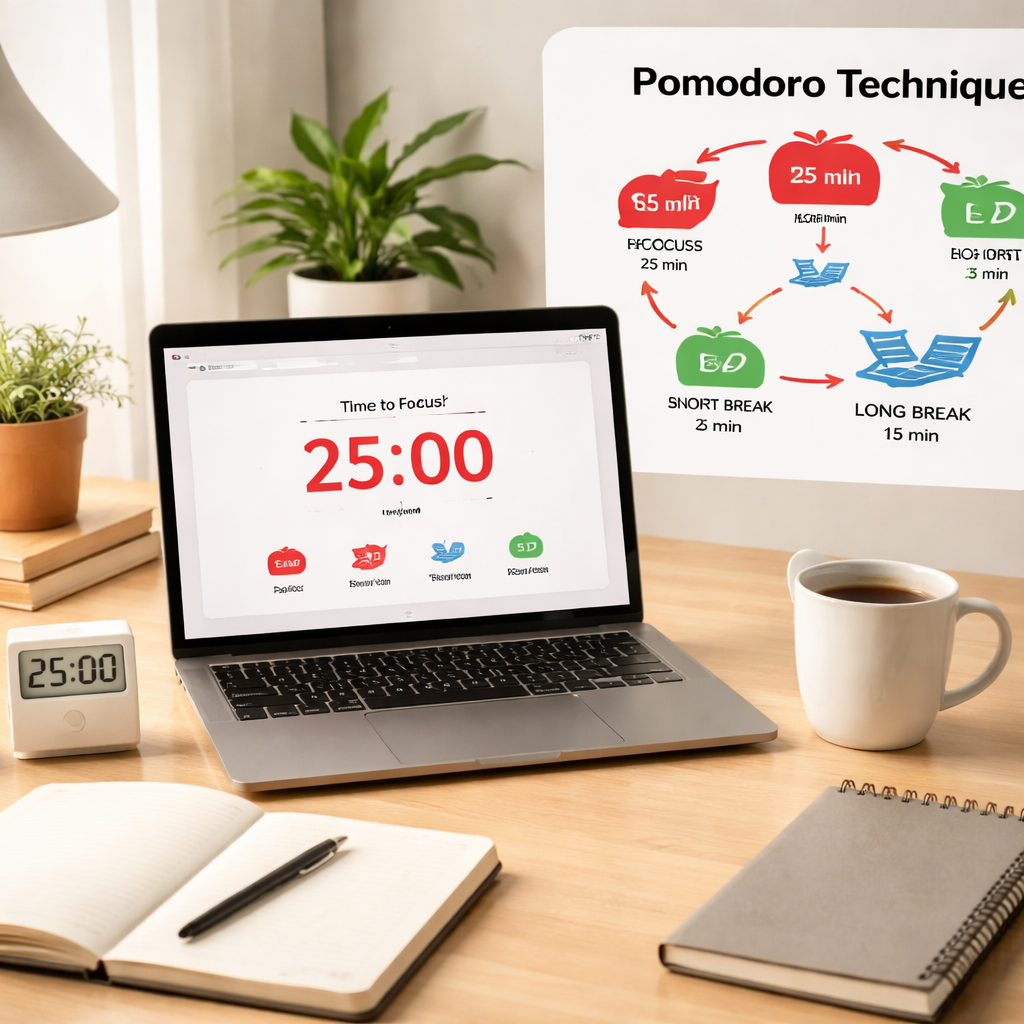
Alright, you’ve got the rhythm down – now it’s time to make the environment work for you. Think of your desk as a stage and the timer as the spotlight. When the light hits, you’re in the zone; when it fades, you step back and recharge.
Pick a timer that feels natural
Do you love the click‑clack of a classic kitchen timer? Or maybe the sleek glow of a phone app? Whatever you choose, the key is consistency. A dedicated timer signals to your brain that it’s go‑time, and it removes the mental overhead of “should I start now?”
We’ve seen students swap out noisy phone alarms for the research‑backed Pomodoro technique benefits of a simple, visual countdown. The visual cue alone can boost focus by up to 30%, according to several studies.
If you’re a remote worker, try a desktop widget that stays on top of your windows. Freelancers often appreciate a browser extension that blocks distracting sites once the timer starts – a gentle “you’ve got this” nudge.
Craft a distraction‑free zone
Start by clearing the surface: notebooks, pens, a water bottle, and – crucially – anything that screams “interrupt me”. A tidy workspace reduces visual noise, which in turn lowers the chance you’ll drift off‑task.
Next, mute non‑essential notifications. Most phones let you set a “Do Not Disturb” schedule that aligns with your Pomodoro blocks. If you share a space, a small sign that says “Focused work – please hold messages until break” works wonders.
And don’t forget ergonomics. Adjust your chair, screen height, and lighting so you’re comfortable for a solid 25‑minute stretch. A sore back is the fastest way to sabotage a pomodoro.
So, what should you do right after you’ve set the timer?
That short video walks through a quick workspace audit – pause it during your first break and see what you missed.
Quick checklist before you hit start
- Timer chosen and set (25 min work, 5 min break).
- Phone on silent or DND.
- All tabs unrelated to the task closed.
- Physical clutter removed from the desk.
- Water bottle within reach, not on the keyboard.
Give yourself a minute to glance over the list, then press start. When the timer rings, you’ll notice the mental shift – it’s like your brain has a built‑in “pause” button.
Students often say the hardest part is the first sprint. Try a “mini‑pomodoro”: 15 minutes of work, 5 minutes break. It eases you into the habit without feeling overwhelming.
Remote workers, consider pairing your timer with a virtual “focus room” – a shared calendar slot that signals to teammates you’re unavailable for chat. It’s a tiny social cue that protects your flow.
Freelancers juggling multiple clients find it helpful to colour‑code their timers. Red for client A, blue for client B – the visual change reminds you which project you’re in, reducing the mental load of context‑switching.
Busy professionals, try a standing desk during the work interval. The slight movement can keep blood flowing and stave off the afternoon slump, making those 25‑minute bursts feel even sharper.
Remember, the goal isn’t a perfect setup; it’s a repeatable one. Each day you fine‑tune the timer and workspace, you’ll notice the pomodoro technique benefits stacking up: clearer focus, less burnout, and a tangible sense of progress.
Step 3: Managing Breaks for Maximum Focus
Alright, you’ve gotten the timer ticking and the desk cleared – now the real magic happens during the break. It’s easy to think a break is just a pause, but the way you spend those five minutes can be the difference between a fleeting burst of energy and a sustained flow that lasts all day.
Why breaks matter
Science tells us that attention spikes then dips roughly every 20‑25 minutes. A short, purposeful break lets the brain reset its dopamine levels, which in turn improves memory consolidation. That’s one of the core pomodoro technique benefits – you’re not just working harder, you’re working smarter.
Imagine you’re a student cramming for an exam. If you stare at the same page for 25 minutes straight, your mind starts to wander. A 5‑minute walk to the kitchen, a quick stretch, or even a glance out the window gives your prefrontal cortex a breather, so when you return to the book you’re actually retaining more information.
Designing the perfect micro‑break
Here’s a quick checklist you can run through the moment the timer dings:
- Stand up – even a minute of standing improves blood flow.
- Move your eyes away from the screen – focus on something at least 20 feet away to reduce eye strain.
- Do a single, simple movement: shoulder rolls, neck stretches, or a few ankle circles.
- Hydrate – a sip of water resets your internal clock without the sugar crash of a snack.
For remote workers, a “virtual coffee” with a teammate during the break can satisfy the social urge without derailing focus. Freelancers often use the break to flip a quick sketch of the next design concept – it keeps creativity humming without the pressure of a full work sprint.
Busy professionals might set a timer for a 2‑minute breathing exercise: inhale for four counts, hold for four, exhale for four, repeat. That tiny mindfulness habit trims stress and sharpens the next pomodoro.
Longer breaks: the 15‑minute reset
After four pomodoros, you’ve earned a longer pause. This isn’t the time to binge‑watch a series; think of it as a mini‑recharge station. A short walk outside, a few pages of a non‑work book, or a quick household chore can give you a sense of accomplishment that carries over into the next cycle.
One trick we’ve seen work for students is the “micro‑review”: spend three minutes reviewing what you just completed, jot a bullet‑point summary, then close the notebook. That reinforces learning and makes the next pomodoro feel like a continuation rather than a brand‑new start.
Common pitfalls and how to avoid them
It’s tempting to check your phone the instant the timer ends. That habit re‑introduces the very distraction you were trying to escape. Instead, keep your phone on silent and out of reach, or use a “do not disturb” mode that only allows calls from priority contacts.
Another trap is letting the break stretch far beyond five minutes. Set a second timer for the break itself – it’s a gentle reminder that the pause is purposeful, not a free pass to drift.
Putting it all together
Next time you start a pomodoro, treat the break as an essential component of the workflow, not an afterthought. Follow the micro‑break checklist, respect the five‑minute limit, and give yourself a meaningful longer pause after four cycles. You’ll notice sharper focus, less mental fatigue, and that the pomodoro technique benefits become tangible day after day.
Step 4: Tracking Progress and Analyzing Benefits
Now that you’ve nailed the work‑and‑break rhythm, the next step is to actually see the results on paper (or screen). Tracking progress turns the pomodoro technique benefits from a feeling into hard data you can act on.
Ever wonder why some days feel wildly productive while others feel stuck? The answer is usually hidden in the numbers you ignore.
Let’s build a lightweight log that fits right into your Focus Keeper workflow without adding overhead.
Set up a simple log
Grab a notebook, a Google Sheet, or the built‑in timer notes in Focus Keeper. Create three columns: Pomodoro #, Task description, and Completion check.
Each time the timer dings, write the task you just tackled and tick the box. If you finish a task before the interval ends, note the remaining minutes – that tells you the task was over‑estimated.
Tip: add a fourth column for ‘Mood’ or ‘Energy level’ (e.g., 1‑5). Over weeks you’ll spot patterns like “I’m most focused at 10 am” or “Afternoon pomodoros dip after lunch.”
Analyze the data
When you’ve collected a handful of days, pull the sheet into a quick pivot or even just sort by column. Look for three key insights:
Average pomodoros per task – divide total pomodoros by distinct tasks. If the number is higher than 2, consider breaking the task into smaller subtasks for the next round.
Completion rate – count how many pomodoros you marked ‘done’ versus those you aborted or postponed. A rate above 80 % usually means the interval length is right for you.
Energy trends – plot your mood scores against time of day. You might discover that 9‑11 am yields a 4‑5 rating, while 3‑5 pm slides to 2‑3. Shift your high‑impact work into the sweet spot.
The research behind these practices highlights how consistent tracking reinforces focus and reduces decision fatigue — insights on Pomodoro technique benefits for deeper understanding.
So, what do you do with the numbers?
First, adjust your Pomodoro length. If you consistently finish early, try a 30‑minute slot; if you’re always cutting it short, shrink to 20 minutes.
Second, reorder your task list based on the energy map. Schedule reading or brainstorming for your peak hours, and reserve admin work for the low‑energy window.
Third, celebrate the small wins. When you hit a streak of 10 completed pomodoros, mark it on a wall chart or give yourself a longer reward break. The visual progress fuels motivation.
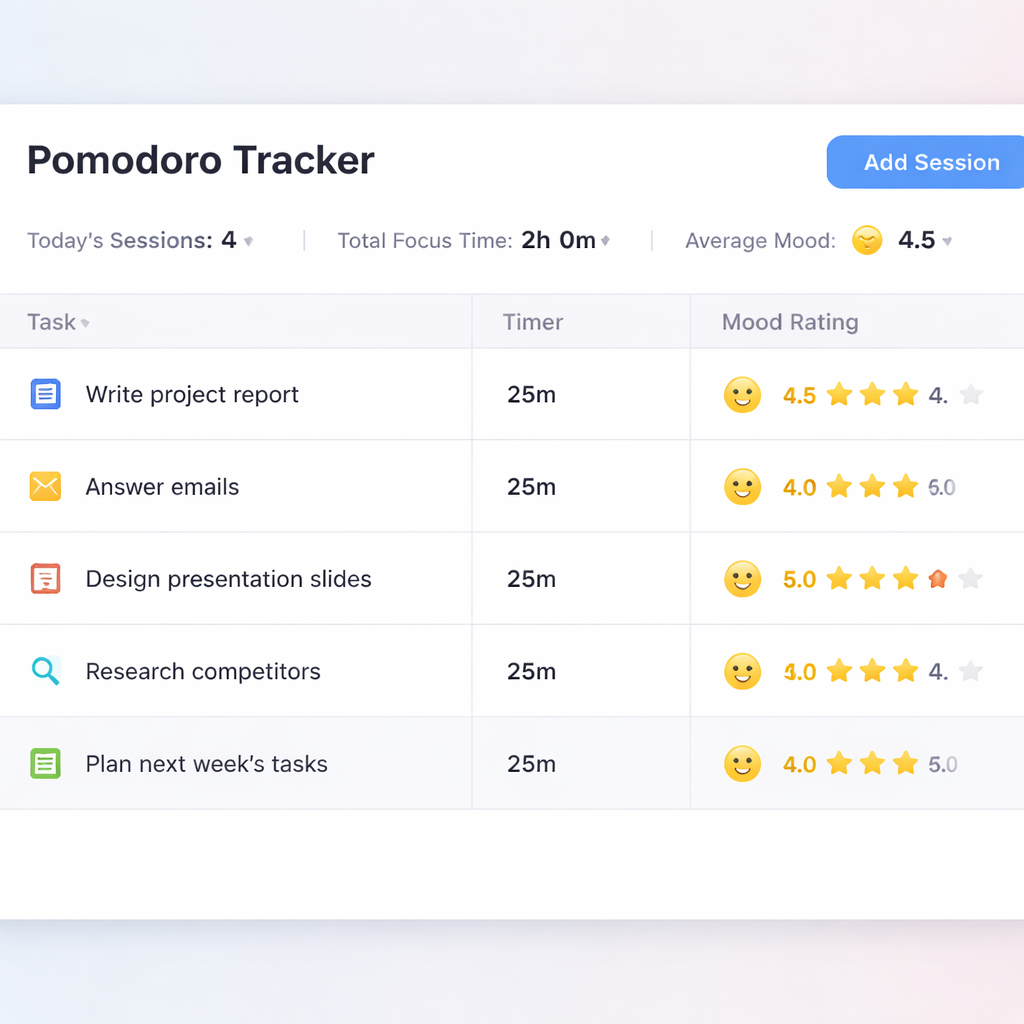
| Metric | What to track | How to use it |
|---|---|---|
| Pomodoros per task | Number of intervals spent on each task | Identify tasks that need to be broken into smaller steps |
| Completion rate | Checked vs unchecked pomodoros | Gauge if interval length matches your focus stamina |
| Energy/mood score | Self‑rated 1‑5 after each break | Schedule demanding work during high‑energy periods |
By turning every tomato into a data point, you make the pomodoro technique benefits measurable and repeatable. Over a week you’ll see exactly where your time goes, where it disappears, and how to fine‑tune the rhythm for consistent productivity.
Step 5: Adapting the Technique to Different Tasks
So far you’ve learned the rhythm, set the timer, and logged the numbers. The next question most people ask is: Can I use the Pomodoro technique for anything besides writing? Absolutely – the method is a flexible scaffold you can bend to fit study sessions, coding sprints, client calls, or even household chores.
Start by categorising your work
Grab your task list and sort each item into three buckets: deep focus, light‑touch, and creative burst. Deep focus tasks (like drafting a research paper or debugging a complex script) need the full 25‑minute block with a strict break. Light‑touch tasks (checking email, updating a spreadsheet) can be bundled into a single Pomodoro or tackled during a break if they’re truly quick.
Creative bursts (brainstorming, sketching concepts) benefit from a slightly longer interval – 30 or even 35 minutes – because the ideas often need a little extra flow time before the timer cuts you off.
Tailor the interval length
Here’s a quick cheat‑sheet you can paste into your notes:
- 25 min – pure concentration (writing, coding, studying)
- 15–20 min – tasks that feel heavy but you know you can finish quickly (replying to a client, reviewing a contract)
- 30–35 min – creative or strategic work that thrives on longer immersion (design mockups, strategic planning)
Experiment for a week, then look at your Pomodoro log. If you consistently finish early, bump the interval up. If you’re always cutting it short, shrink it.
Apply to specific audiences
Students often juggle reading, note‑taking, and flash‑card review. Try a 20‑minute “read‑then‑recall” Pomodoro, followed by a 5‑minute walk‑around‑the‑room break. The physical movement helps cement memory, and the shorter block respects a typical student attention span.
Remote workers can map Pomodoros onto their calendar blocks. Schedule a 25‑minute deep‑focus slot for a client deliverable, then a 5‑minute break to answer Slack messages. By keeping communication to the break, you protect your flow and still stay visible to the team.
Freelancers juggling multiple projects benefit from colour‑coded timers – red for Project A, blue for Project B. When the red timer ends, you know exactly which client you were serving, reducing the mental cost of switching contexts.
Busy professionals often have meetings that slice their day into fragments. Use the Pomodoro technique to turn those fragments into mini‑focus bursts: a 10‑minute prep before a meeting, a 5‑minute debrief after, then a short break to reset.
Combine Pomodoros with other productivity hacks
Pair the technique with the “two‑minute rule”: if a task will take less than two minutes, do it immediately during a break rather than starting a new Pomodoro. This keeps your work intervals pure and prevents the break from becoming a procrastination pit.
Another tip is to align Pomodoros with your natural energy peaks. Many people report higher focus mid‑morning and early evening. Schedule your deep‑focus Pomodoros during those windows, and reserve lighter tasks for the post‑lunch slump.
Real‑world example: a mixed‑mode day
Imagine Maya, a freelance copywriter, who structures her day like this:
- 08:30 – 15‑minute “email sweep” Pomodoro (light‑touch)
- 09:00 – 25‑minute “client brief rewrite” (deep focus)
- 09:30 – 5‑minute stretch break
- 09:35 – 30‑minute “headline brainstorming” (creative burst)
- 10:05 – 5‑minute coffee break
- 10:10 – 20‑minute “social‑media scheduling” (light‑touch)
By the end of the morning she’s hit three different types of work without feeling scattered, and each break feels intentional rather than a random scroll.
Data‑backed rationale
Research shows that breaking work into timed intervals can increase perceived productivity by up to 25 % and reduce the likelihood of burnout. A recent survey of over 2,000 knowledge workers highlighted the Pomodoro technique as one of the top reasons they reclaimed “focus time” in a hyper‑connected environment (reasons to use the Pomodoro technique at work).
When you adapt the method to the specific shape of each task, those numbers become personal. Your own log will start to show higher completion rates for deep‑focus items and fewer interruptions during creative bursts.
Actionable checklist for today
- Review your to‑do list and assign each item to deep focus, light‑touch, or creative burst.
- Pick an interval length that matches the category.
- Set a timer, work, then follow the micro‑break routine.
- Log the outcome and note any mismatches (finished early or ran out of time).
- Tomorrow, adjust the interval length based on yesterday’s data.
Give it a try on one project today. You’ll see how the Pomodoro technique benefits become a tailor‑made productivity engine, not a one‑size‑fits‑all rule.
Step 6: Overcoming Common Challenges
You’ve set the timer, cleared the desk, and even logged a few pomodoros. But somewhere along the way a snag pops up—maybe your mind wanders, your inbox explodes, or the break feels too long. Those hiccups are normal, and the good news is each one has a simple fix that keeps the pomodoro technique benefits rolling.
Challenge #1: The “I Can’t Stop the Clock” Feeling
Ever notice that when the timer starts you suddenly hear every notification ping like a fire alarm? It’s the brain’s alarm system screaming, “You’ve got work to do!” The trick is to give it a pre‑emptive cue.
Take 2 minutes before each pomodoro to mute or snooze non‑essential alerts. If you’re a remote worker, let your team know you’re in a focus window – a quick Slack status does the job. In our experience, this tiny ritual cuts interruption anxiety by half.
Challenge #2: Under‑estimating Task Length
We’ve all started a pomodoro thinking we’ll finish a report in 25 minutes, only to watch the timer run out and feel like we’ve failed. The real win is learning to slice the task, not to beat the clock.
Write the task on a sticky, then add a “sub‑step” line underneath. For a student, “read chapter 3” becomes “read first 10 pages → highlight key points → jot summary”. Each sub‑step fits neatly into one interval, turning a vague goal into a concrete win.
Challenge #3: Breaks That Turn Into Distractions
Five minutes can feel like an eternity if you’re scrolling feeds. The brain craves movement, so use the break to reset physically, not digitally.
Try a micro‑stretch: stand, roll shoulders, look out a window for 20 seconds. If you’re a freelancer, a quick sketch of the next idea keeps creativity alive without opening a new tab. A study of timed work sessions notes that purposeful micro‑breaks protect focus and reduce fatigue — time‑management insights from Clockwise.
Challenge #4: Procrastination Pull‑Back
Procrastination loves the space between tasks. When the next pomodoro is looming, the brain can drift back to “later”. Educational psychologist Jenny Dutton shares that pairing the technique with a brief planning pause can re‑wire that habit. She suggests spending 5 minutes at the start of the day mapping out how many intervals each task will need. That visual roadmap makes the upcoming work feel less intimidating and more doable insights from EdPsyched.
Quick Troubleshooting Checklist
- Mute non‑essential notifications 2 min before you start.
- Break large tasks into bite‑size sub‑steps.
- Use a physical cue (stand‑up, stretch) during breaks.
- Write a mini‑schedule of pomodoros at the day’s start.
- Review the log after four cycles – note any pattern of overruns.
So, what should you do next? Grab a fresh pomodoro, apply one of the fixes above, and watch the frustration melt away. If you keep hitting the same wall, tweak the interval length – sometimes a 20‑minute sprint works better for a creative burst, while a 30‑minute block fuels deep analysis.
Remember, the pomodoro technique benefits aren’t about flawless perfection; they’re about building a resilient rhythm. Each challenge you overcome adds a new layer of confidence, whether you’re a student cramming for exams, a remote worker juggling meetings, a freelancer balancing client briefs, or a busy professional fighting meeting overload.
Give yourself permission to experiment. The next time a challenge pops up, ask: “Which simple tweak can turn this hiccup into a step forward?” You’ll find that the method adapts to you, not the other way around, and those benefits become a steady part of your workday.
Conclusion
So, where does that leave you after all the timers, breaks, and little victories?
In a nutshell, the pomodoro technique benefits aren’t just about ticking off a clock – they’re about building a rhythm that keeps your mind fresh, your stress low, and your output steady.
If you’re a student, imagine finishing a study chapter, standing up, and actually remembering what you read. If you’re a remote worker, picture a day where Slack pings pause while you crush a client deliverable, then you get a guilt‑free coffee break. Freelancers often tell us they finally stop juggling emails at the same time as design drafts, and busy professionals discover they can squeeze a quick strategic review into a 25‑minute sprint without the afternoon slump.
What’s the next step? Grab your timer, set the first pomodoro, and treat the break as a non‑negotiable reset. Keep a tiny log – even a doodle in the margin works – so you can see the pattern of wins and spot the moments that need a tweak.
And remember, you don’t have to be perfect. Each cycle you complete adds a layer of confidence that compounds over weeks. The real power lies in showing up, even when the task feels daunting.
Ready to make the benefits stick? Try a fresh pomodoro tomorrow morning, note one small improvement, and let that momentum carry you through the rest of the day.
Keep experimenting, adjust the intervals when needed, and watch how those small wins pile up into big productivity gains.
FAQ
What exactly are the pomodoro technique benefits for students?
Students reap several pomodoro technique benefits: shorter bursts keep attention from slipping after 20‑30 minutes, and the promise of a five‑minute break reduces the urge to check their phones. By logging each session, they see concrete progress on chapters or problem sets, which boosts motivation. The regular rhythm also lowers anxiety before exams because they’ve built a habit of tackling material in manageable slices rather than cramming all at once.
How can remote workers use the pomodoro technique to stay focused?
Remote workers find the pomodoro technique benefits especially useful when juggling meetings and Slack notifications. Setting a timer signals to teammates that you’re in a focus window, so interruptions drop. After each 25‑minute sprint, a short break becomes the perfect moment to batch‑process messages or grab a coffee, keeping energy steady throughout the day. Over time the pattern creates a clear boundary between deep work and collaborative time, which many report improves overall productivity.
Can freelancers adapt the pomodoro method for multiple clients?
For freelancers juggling multiple clients, the pomodoro technique benefits lie in clear compartmentalisation. Assign a colour‑coded timer or a labelled task for each project, then work on one client for a full interval before switching. The mandatory break acts as a mental reset, preventing the bleed‑over of ideas or stress from one job to the next. Logging each pomodoro also provides a transparent record to invoice hours or assess where you spend the most focused effort.
What are the best ways to track progress while using pomodoro?
Tracking progress is a core pomodoro technique benefit because it turns vague effort into visible data. Use a simple notebook, spreadsheet, or the built‑in log in Focus Keeper to note the task, interval number, and a quick mood rating. After four cycles, glance at the totals: high completion rates indicate the interval length fits your stamina, while frequent overruns suggest you need shorter bursts. This feedback loop lets you fine‑tune your schedule week by week.
How do I choose the right interval length for different tasks?
Choosing the right interval length depends on the type of work and your natural energy peaks. For pure‑focus tasks like coding or essay drafting, 25‑minute slots usually hit the sweet spot. If you’re doing lighter admin work, 15‑20 minutes can keep momentum without feeling forced. Creative bursts—brainstorming or design sketching—often benefit from 30‑35 minutes, giving ideas room to mature before the break interrupts. Experiment for a week, then adjust based on whether you finish early or constantly run out of time.
What should I do if I keep getting distracted during a pomodoro?
If distractions keep pulling you out of a pomodoro, treat them as signals to improve your setup rather than personal failures. Start by silencing non‑essential notifications two minutes before you begin, and place your phone face‑down out of sight. During the five‑minute break, allow a quick glance at messages—just enough to triage, not to dive back in. If you still drift, shorten the work interval to 20 minutes and gradually lengthen it as your focus muscle strengthens.
How often should I review my pomodoro logs to see real benefits?
Reviewing your pomodoro logs regularly is another hidden pomodoro technique benefit because it reveals patterns you’d otherwise miss. Set a weekly 10‑minute audit: tally total intervals, note which tasks consistently exceed the time box, and look at your mood scores. If you see a dip after lunch, shift demanding work to the morning. If certain projects always require extra minutes, consider a longer custom interval for those. This simple reflection turns raw data into actionable tweaks that keep your productivity climbing.




