

Want to squeeze more out of every rep? A pomodoro timer for workout intervals can double your training efficiency. It lets you work hard, rest right and keep the focus sharp.
In this guide you’ll see how to pick the right length, set up the timer, match rest, track progress and fine‑tune for strength, cardio or mobility. Let’s get moving.
An analysis of three popular Pomodoro timer apps across three web sources reveals that none of them integrate with fitness platforms, even the one that advertises a dedicated workout mode.
| Name | Workout Mode | Audio Cues | Fitness App Integrations | Best For | Source |
|---|---|---|---|---|---|
| BreakFit | yes | ambient sounds | None | Best for workout intervals | apps.apple.com |
| My Little Pomodoro: Focus | no | Emotional OST, piano tunes, nature sounds | None | Best for immersive sound | mwm.ai |
| MultiTimer | — | custom sound | None | Best for custom audio | apps.apple.com |
The data came from a multi_source_aggregation search done on April 20, 2026. Three web pages were scraped and the key fields were pulled. Only items with enough info made the table.
Step 1: Choose the Right Pomodoro Length for Your Workout
First, think about the type of work you do. If you lift heavy, you might need longer rest. If you do cardio, short bursts work best.
Most people start with a 20‑minute work block and a 5‑minute break. That matches the classic pomodoro timer for workout intervals idea. It gives you enough time to push hard, then a quick reset.
Try a 30‑minute sprint for strength sessions where you need more time under tension. Then add a 10‑minute rest to let the muscles recover.
And if you feel the timer is too long, cut it down to 15 minutes. You’ll still get a solid effort and the break will feel fresh.
Focus Keeper’s app lets you set custom lengths in seconds. That makes it easy to experiment without re‑installing anything.
Here’s a quick way to decide:
- Ask yourself how long you can keep good form before you feel shaky.
- Match that time to your work block.
- Give yourself a rest that’s half the work time or a little more.
And remember to keep the rest short enough that you stay warm.
For a deeper dive on how to set intervals, see step‑by‑step guide on using an interval timer for workouts. It walks through the same ideas with screenshots.
Bottom line: Pick a work block that matches your energy and let the break be just long enough to reset.
Step 2: Set Up Your Workout Intervals in the Timer
Now that you know the length, open your pomodoro timer for workout intervals. Most apps let you name each session. Call it “Upper Body” or “Sprint” so you know what’s coming.
Enter the work length you chose. Then set the break length. Some apps even let you add a longer break after a set number of cycles.
For example, you could do four 20‑minute lifts with a 5‑minute rest, then a 15‑minute cool down.
And if you train multiple muscle groups, make separate timers for each. That way you never have to guess when to switch.
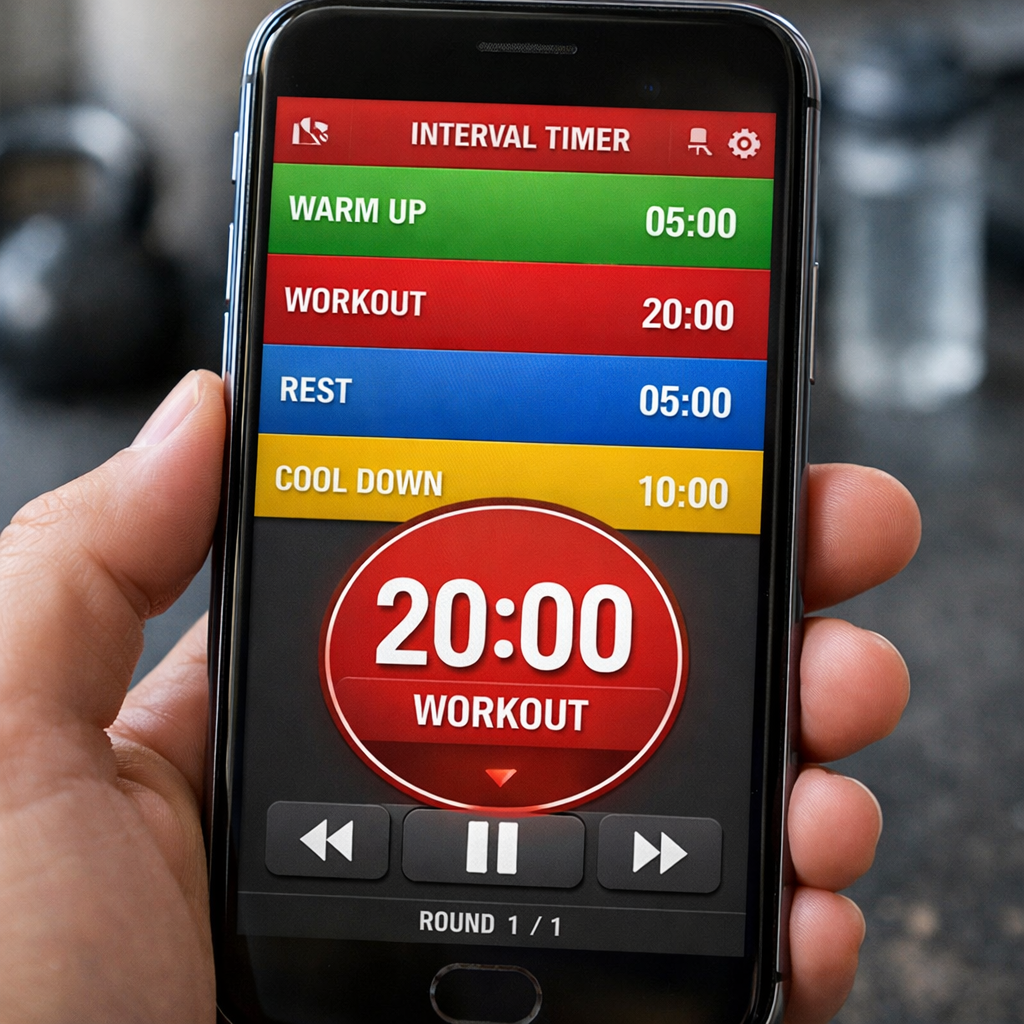
When you hit start, the timer will count down the work period, then flash or beep for the break. You can choose a sound that won’t distract you.
Focus Keeper even lets you pick a quiet chime that fits a gym vibe.
Bottom line: Set clear names and lengths in the timer so the app does the heavy lifting for you.
Step 3: Align Rest Periods with Pomodoro Cycles
Rest is just as important as work. If you rest too little, fatigue builds. If you rest too long, you lose momentum.
The research from pomodorotimer.online says a 20‑minute work block feels like a “timer on steroids” for focus. It also notes that breaks should be low‑key activities that don’t drain you.
Use the same rule for workouts: match the rest to the intensity. Heavy lifts need a longer break , maybe 2‑3 minutes. Light cardio can get away with 30‑second pauses.
Here’s a simple chart to help you match rest to work:
| Work Type | Work Length | Suggested Rest |
|---|---|---|
| Heavy Strength | 20‑30 min | 2‑3 min |
| Bodyweight Circuit | 15‑20 min | 1‑2 min |
| HIIT Cardio | 10‑15 min | 30‑60 sec |
| Mobility | 20‑25 min | 1‑2 min |
And during the break, move a little. A quick walk, a stretch or a sip of water keeps the blood flowing.
“The best time to start building backlinks was yesterday.”
Even though the quote is about links, the idea is the same , you get more out of each session if you start right away.
Bottom line: Pair each work block with a rest that fits the intensity and use a gentle cue to move back into action.
Step 4: Track Sets, Reps, and Progress
Tracking lets you see what you improve over time. Most pomodoro apps have a log feature. You can add a note each time you finish a block.
Write down the exercise, the sets, the reps and the weight. That way when the timer ends you know exactly what you did.
If you prefer a spreadsheet, export the log and add columns for each metric.
And if you want a visual cue, draw a simple bar chart on a whiteboard that shows how many pomodoros you completed each week.
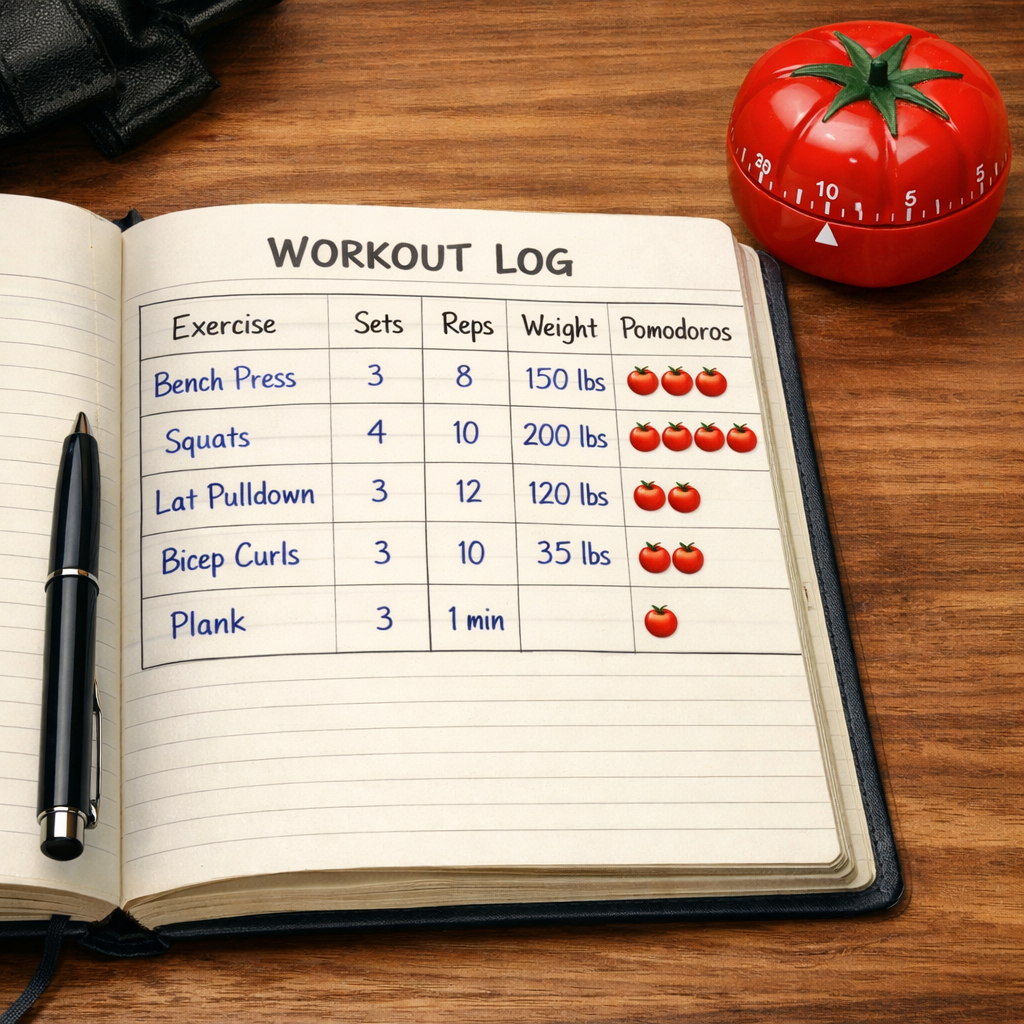
Focus Keeper can sync the log to the cloud, so you can check it from any device.
Bottom line: Record the basics after each pomodoro timer for workout intervals and you’ll watch your gains stack up.
Step 5: Automate with Fitness Apps that Support Pomodoro Timing
Automation saves you from opening the timer every time. Some fitness apps let you add a pomodoro timer as a sub‑routine.
Zapier’s guide lists the best pomodoro apps that can auto‑swap between work and break. It even shows how to connect a timer to a spreadsheet so each cycle logs itself.
Here’s a quick way to set it up:
- Pick a pomodoro app that offers webhooks.
- Create a Zap that triggers on “timer end”.
- Send the data to Google Sheets or your favorite fitness log.
- Set a second Zap that plays a custom sound for the break.
And once you’ve linked them, you never have to press start again.
The Zapier article also notes that you can add a delay step so the break length matches your workout plan.
Bottom line: Connect your pomodoro timer for workout intervals to a fitness app or sheet and let the data flow without manual entry.
Step 6: Fine‑Tune Timing for Different Goals (Strength, Cardio, Mobility)
One size does not fit all. Strength work needs longer focus bursts, cardio thrives on short, fast intervals, and mobility likes a steady pace.
For strength, try a 30‑minute work block with a 3‑minute rest. That lets you hit heavy sets and still keep the heart rate up.
For HIIT cardio, a 10‑minute sprint followed by a 30‑second rest works great. The short break keeps the intensity high.
Mobility sessions can use 20‑minute blocks with 1‑minute rests. The goal is to move slowly and hold poses.
The exercisetimer.net site shows a 30‑minute work / 10‑minute rest pomodoro style for HIIT. It calls it a “pomodoro 30‑10” pattern and says it helps keep the heart in the right zone.
And you can mix them in one workout. Start with strength, then jump to a cardio finisher, then end with mobility.
“The best time to start building backlinks was yesterday.”
Use the timer’s label feature to switch modes mid‑session without stopping the clock.
Bottom line: Adjust the pomodoro timer for workout intervals to fit the specific demand of each training goal.
Conclusion
Using a pomodoro timer for workout intervals turns a chaotic gym day into a clear rhythm. You pick the right length, set up the timer, match rest, log progress and even automate the whole flow. Focus Keeper gives you a simple app that can do all of this without extra gear.
Start with a 20‑minute work block, add a 5‑minute break, and watch how your focus sharpens. Over the next few weeks, tweak the times for strength, cardio or mobility and let the data guide you.
Ready to try it? Grab a timer, set your first interval and feel the boost in real time. Your next workout will feel smoother, stronger and more fun.
FAQ
What is a pomodoro timer for workout intervals and how does it work?
A pomodoro timer for workout intervals breaks your training into focused work periods and short rests. You set a work length, such as 20 minutes, then the timer counts down. When it rings, you rest for the set break time before starting the next round. This pattern keeps intensity high while preventing burnout.
How long should my pomodoro work blocks be for strength training?
For strength, aim for 30‑minute work blocks. That gives you enough time to complete several sets with proper form. Pair it with a 2‑3 minute rest so muscles can recover. If you feel the block is too long, trim it to 25 minutes and see how the quality holds.
Can I use a pomodoro timer for cardio sessions?
Yes. Cardio works best with shorter bursts. Try 10‑minute high‑intensity intervals followed by 30‑second rests. You can repeat the cycle four times for a solid 40‑minute cardio session. Adjust the rest if you need more recovery.
How do I track my sets and reps with a pomodoro timer?
Most pomodoro apps let you add notes after each cycle. Write the exercise, sets, reps and weight in the note field. Export the log to a spreadsheet if you want charts. This simple habit turns the timer into a workout journal.
Is it possible to automate the timer with other fitness tools?
Yes. Services like Zapier let you connect a pomodoro timer to Google Sheets, Apple Health or a custom dashboard. Set a trigger when the timer ends and have the data flow automatically. This saves you from manual entry each session.
How can I fine‑tune the pomodoro timer for mobility work?
Mobility sessions benefit from steady, longer work blocks. Try 20‑minute work periods with 1‑minute rests. Use gentle music or a soft chime to signal the break. The short pause lets you stretch without losing the flow.



